Introduction
Artificial intelligence has become a central focus in the evolution of Microsoft 365 products — and SharePoint is no exception. Today, SharePoint AI is transforming the way organizations collaborate, and automate everyday workflows. Built-in AI capabilities already help users find information faster and process documents intelligently.
This article will explore how AI works within SharePoint, what smart features are already available to users, what new possibilities Microsoft Copilot opens up, and how those capabilities can be extended even further with additional solutions from Virtosoftware.
Chapter 1. What Is SharePoint AI and Why It Matters
Nowadays information management goes far beyond storing files in the cloud. SharePoint AI represents a new generation of intelligent collaboration tools built to make content easier to work with.
1.1 The Rise of Artificial Intelligence in Microsoft 365
Microsoft has been rapidly integrating artificial intelligence across the Microsoft 365 ecosystem — including SharePoint, Word, Outlook, and Teams. These improvements are not just about automation; they are about using organizational knowledge in smarter ways.
A common question users ask is: *Does Microsoft have AI like ChatGPT?*The answer is yes. Microsoft has introduced Copilot, an AI-powered assistant built into Microsoft 365 products. Copilot operates on advanced GPT models, developed in partnership with OpenAI and powered by Microsoft Azure. It processes and interprets user content, helps create texts, summarizes documents, and generates insights.
Thanks to this integration, SharePoint AI has transformed from a data storage platform into a hub for intelligent interaction with information. AI now helps understand the context and relationships between documents, allowing users to access knowledge in a more meaningful way.
1.2 The Technological Foundation of SharePoint AI
Behind the intelligent features of SharePoint AI lies a powerful framework known as Microsoft Graph. This data layer connects information from across the entire Microsoft 365 ecosystem — including Outlook emails, Teams chats, OneDrive files, and calendar events. By connecting these data sources, SharePoint gains an understanding of how users interact with content.
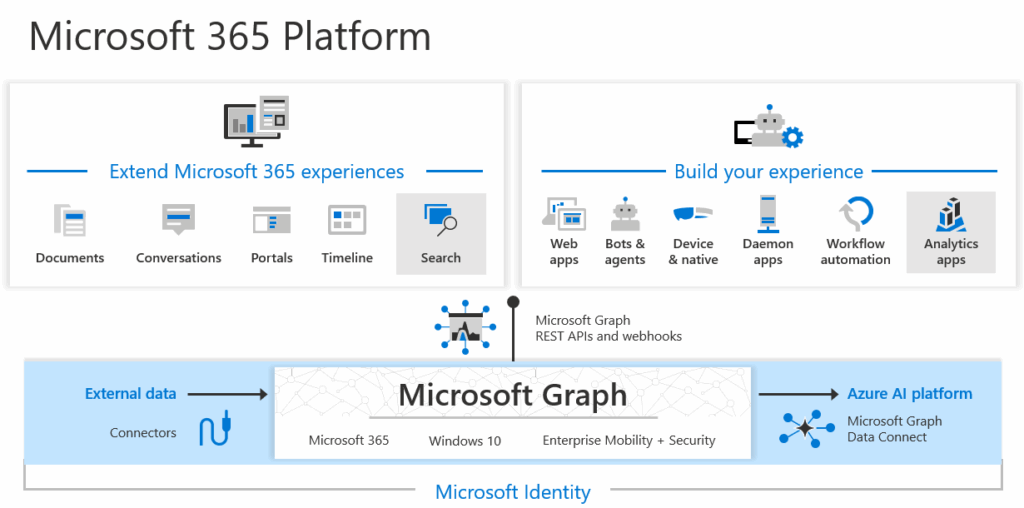
Through machine learning algorithms, SharePoint AI analyzes several aspects of user activity, such as:
- document types and structures,
- patterns of collaboration between employees,
- file version history and user engagement.
Based on these insights, the system makes intelligent suggestions that anticipate user needs. For example, it may suggest a relevant file when someone works on a similar project, or remind a team member to update a document that has not been revised for a while. This helps employees save time, avoid duplication, and make informed decisions while working inside SharePoint.
AI Integration in SharePoint
Many users wonder: Is there AI for SharePoint? The answer is yes. Artificial intelligence is now an integral part of SharePoint Online, fully embedded in the Microsoft 365 ecosystem. SharePoint AI represents a set of intelligent technologies that work together to improve communication and knowledge management.
Key components of this AI ecosystem include:
- Microsoft Graph – analyzes connections between users, documents, and activities to create context-aware recommendations and insights.
- Microsoft Copilot for SharePoint – a natural language interface that helps generate content such as news posts, site pages, and summaries directly within SharePoint.
- AI-powered Search (Microsoft Search) – uses machine learning to improve result relevance and give answers based on user context.
- Power Automate + AI Builder – automates routine like document processing, approval chains, and notifications through prebuilt or custom AI models.
All these features are natively integrated into SharePoint, requiring no additional configuration. Organizations can instantly use SharePoint AI features to create smarter workplaces.
Why AI Matters in SharePoint
Artificial intelligence is changing the way companies use SharePoint, turning it into more than just a document repository. SharePoint AI allows teams to find information faster, and collaborate more effectively across departments.
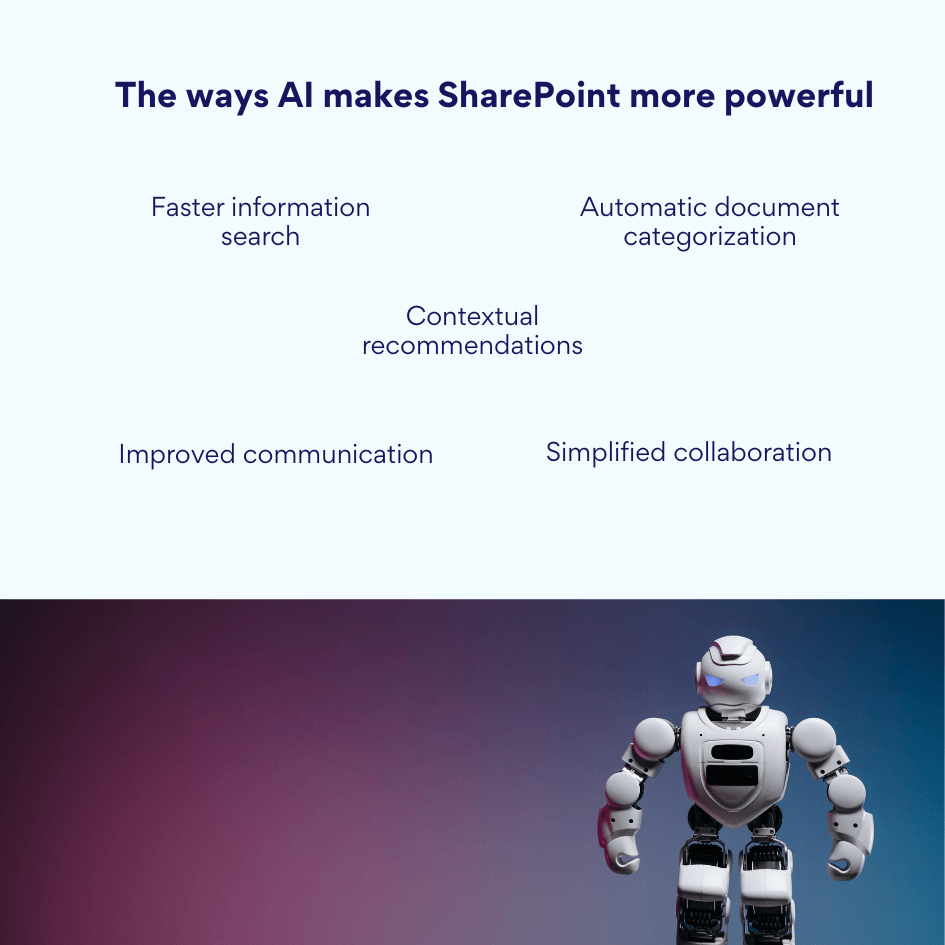
Here are the key ways AI makes SharePoint more powerful:
- Faster information search – AI helps retrieve relevant content even when users don’t remember the exact file name. SharePoint AI suggests the most likely documents or pages by understanding the context of a query.
- Automatic document categorization – The system can recognize the type of file — whether it’s a contract, presentation, or report — and apply metadata or tags, keeping libraries organized without manual work.
- Contextual recommendations – SharePoint AI analyzes ongoing projects and user interactions, offering related documents or suggesting colleagues who may be relevant for communication.
- Simplified collaboration – AI can automatically generate meeting summaries, suggest next action points, or create internal news posts based on corporate updates.
- Improved communication – By connecting content, people, and business processes, SharePoint AI helps employees work with greater speed, and accuracy.
In essence, SharePoint AI transforms everyday operations by making knowledge more accessible and collaboration more intelligent.
Chapter 2. How AI Works in SharePoint: Advanced Functionality
As artificial intelligence becomes deeply embedded in the Microsoft 365 ecosystem, SharePoint AI uses a complex technological framework to offer context-driven assistance. At the core of this system is Microsoft Graph, which connects data, people, and content across an organization.
2.1 The Role of Microsoft Graph in AI Operations
Microsoft Graph can be described as the brain of SharePoint AI. It collects data from all Microsoft 365 services — including Exchange, Teams, OneDrive, SharePoint, Viva, and Power BI — to provide a contextual understanding of how users interact with each other and with content.
Using this connected data, Graph creates personalized recommendations and highly relevant search results. For instance, if an employee uses certain files every day or collaborates with specific colleagues, SharePoint AI will automatically suggest related documents, sites, or contacts the next time that person searches for a content.
Microsoft Graph also plays a vital role in enabling Copilot to interpret user requests correctly. It provides context about company structure, relationships between documents, and activity patterns, allowing Copilot to deliver accurate responses, and suggestions within SharePoint.
2.2 Microsoft Copilot for SharePoint
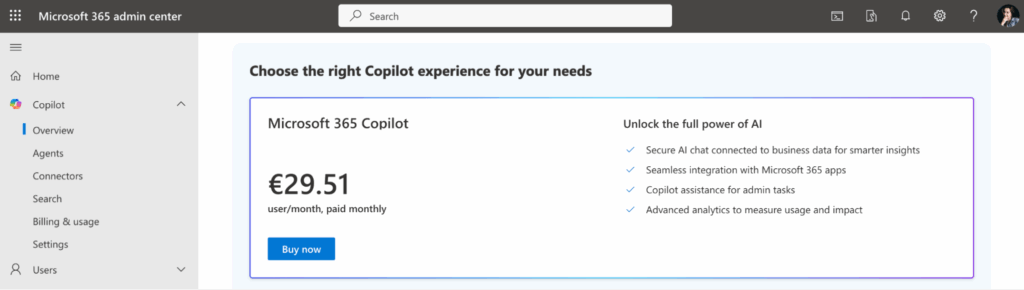
Many users ask: Is there Copilot for SharePoint? Yes, Microsoft Copilot is fully integrated into SharePoint Online and is available as a separate Microsoft 365 Copilot subscriptions that include AI functionality. It serves as the main interface for interacting with the intelligent Microsoft 365 tools.
Copilot for SharePoint operates on large language models (GPT) combined with organizational data provided by Microsoft Graph. This synergy allows the system to understand the context of queries, process corporate content, and generate relevant outputs directly within the SharePoint.
With SharePoint AI powered by Copilot, users can:
- Create content effortlessly – generate news pages, reports, or summaries from a simple text command (for example, “Create a page with quarterly sales results”). Copilot automatically gathers data from Excel and Teams, formats it, and publishes a complete SharePoint page.
- Auto-structure and format documents – refine layout, text hierarchy, and metadata without manual editing.
- Find and recommend relevant materials – spots connected presentations, files, or reference documents based on user context.
- Enhance communications – suggest responses or summaries of discussions, helping teams stay aligned.
- Summarize and interpret content – extract insights from long texts or documents, providing summaries and next steps.
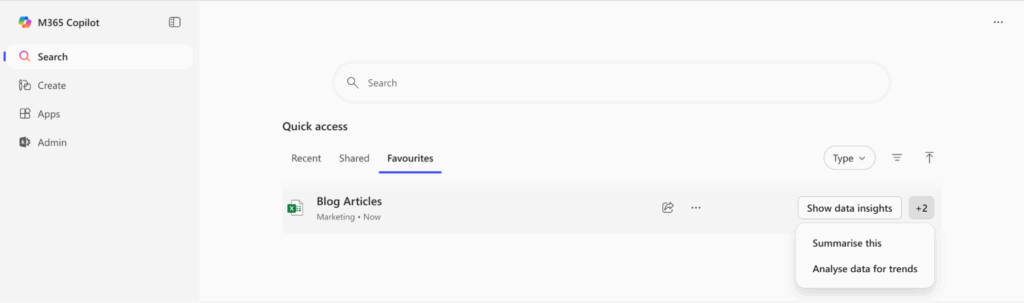
Importantly, Copilot does more than simply copy or combine data — it interprets and transforms it into usable knowledge.
2.3 Intelligent Search and Recommendations in SharePoint
Artificial intelligence has completely transformed the search experience in SharePoint. What was once a simple keyword-based tool is now an intelligent recommendation system powered by SharePoint AI. Modern Microsoft Search uses machine learning and data from Microsoft Graph to understand the context behind queries, analyze user behavior, and interpret interactions across Microsoft 365 ecosystem.
The AI-driven search considers which documents a user has accessed recently, the colleagues they collaborate with, and the sites or libraries they visit most often. Using this contextual understanding, SharePoint AI provides personalized search results tailored to individual workflows.
For example, if a user searches for “article brief,” the system won’t just return every file containing those words. Instead, it highlights the briefs that are most relevant to that user’s department or ongoing project and prioritizes materials created or edited by their close collaborators.
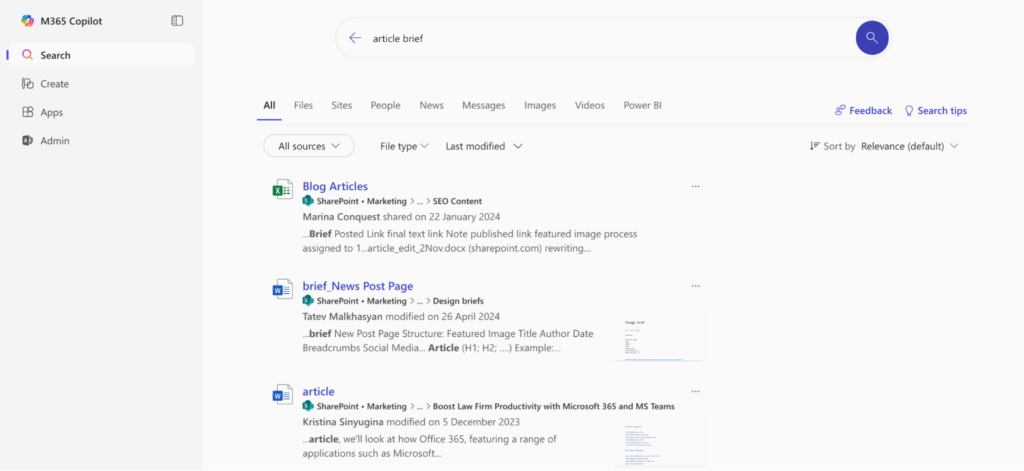
Beyond active queries, SharePoint AI also delivers proactive recommendations — such as recently updated documents linked to current tasks, or new resources that team members have created.
One of the most powerful new features in SharePoint AI is the introduction of SharePoint Agents. Each SharePoint site automatically includes a ready-made AI-powered agent that helps users interact with site content through natural language queries. These agents answer questions about documents, summarize content, and extract insights — all while respecting user permissions. Moreover, users with site editing rights can create and customize their own agents scoped to specific data.
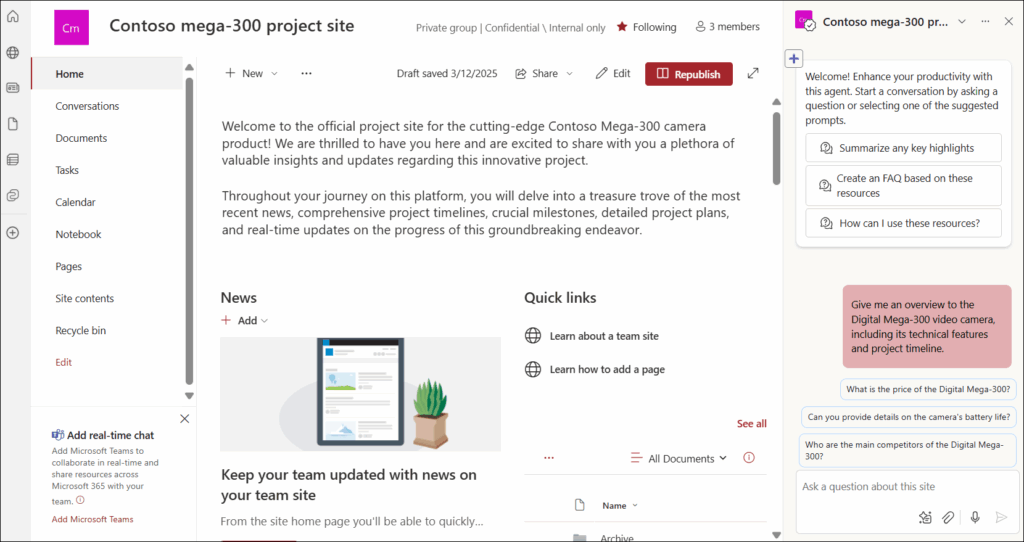
SharePoint Agents can also be integrated with Microsoft Teams.
👉 Discover how to get started with SharePoint agents »>
By turning simple search into a context-aware experience, SharePoint AI evolves into an intelligent assistant that anticipates what data will be useful next — helping teams save time and make data-driven decisions.
2.4 AI Builder and Power Automate — Process Automation
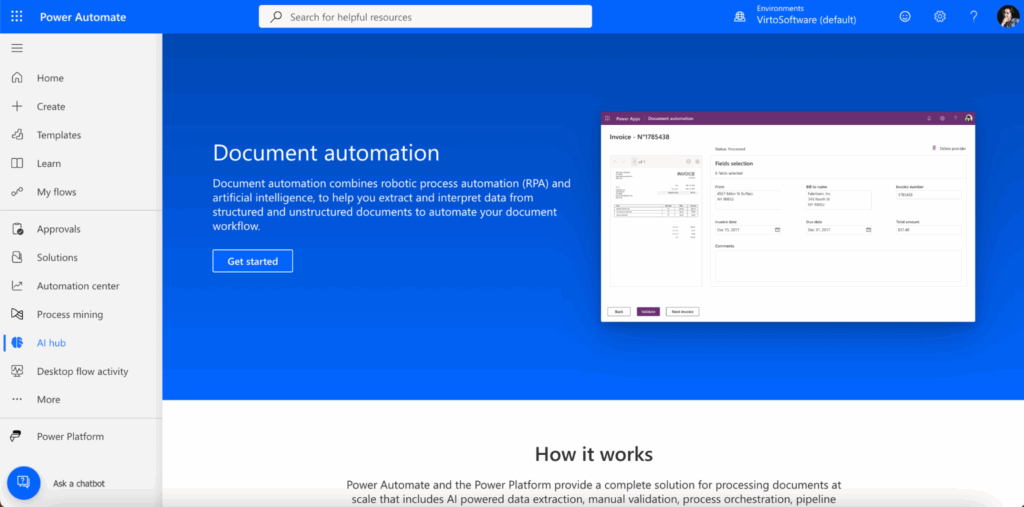
AI Builder is a core component of Microsoft’s Power Platform that brings artificial intelligence into business workflows — all without any coding. When combined with Power Automate, SharePoint gains advanced automation capabilities that allow routine processes to run in the background.
Through Power Automate and AI Builder, SharePoint AI can:
- automatically process newly uploaded documents;
- extract information from contracts, invoices, or forms;
- classify files and trigger actions such as alerts, approvals, or task assignments.
This automation reduces manual tasks, minimizes errors, and speeds up document handling. For example, when a contract is uploaded to a specific SharePoint library, AI Builder can recognize essential fields (like client name or contract value), populate them in a list, and initiate an approval flow via Power Automate — saving hours of work.
2.5 Personalization and Predictive Insights
SharePoint AI continuously analyzes user activity to deliver the right content at the right time. This level of personalization creates the experience of a truly smart intranet, where the system doesn’t just respond — it anticipates user needs.
For example, when an employee begins working on a new marketing campaign, SharePoint AI might automatically suggest previous campaign reports, related presentations, or colleagues who worked on similar projects. On a broader scale, AI also helps detect trends across the organization, such as frequently used materials or pages with low engagement, for better content planning and improvement.
2.6 Integration with Other Microsoft AI Services
SharePoint AI is deeply integrated with the wider suite of Microsoft’s intelligent services, creating a connected digital ecosystem:
- Viva — an employee experience platform focused on engagement, learning, knowledge, and wellbeing. It combines modules like Viva Connections, Viva Learning, Viva Topics, and Viva Engage to foster culture, learning, and collaboration across the company.
- Insights — an app for detailed analytics and recommendations for personal productivity. It provides data-driven insights into work patterns, collaboration habits, and burnout risks, helping users improve their work-life balance.
- Power BI — visualizes and analyzes data stored in SharePoint and beyond, turning raw information into business intelligence through interactive dashboards.
- Teams AI — improves communication management by summarizing meetings, extracting action points, and linking insights directly back to SharePoint content.
Together, these tools make SharePoint the core of the corporate AI infrastructure, connecting content, people, and analytics into a unified environment for smarter work.
Chapter 3. Practical Applications of SharePoint AI
Artificial intelligence in SharePoint has moved beyond theory — it is already transforming how companies store and find information, and collaborate across teams. SharePoint AI simplifies processes, helping users to focus on meaningful tasks instead of routine.
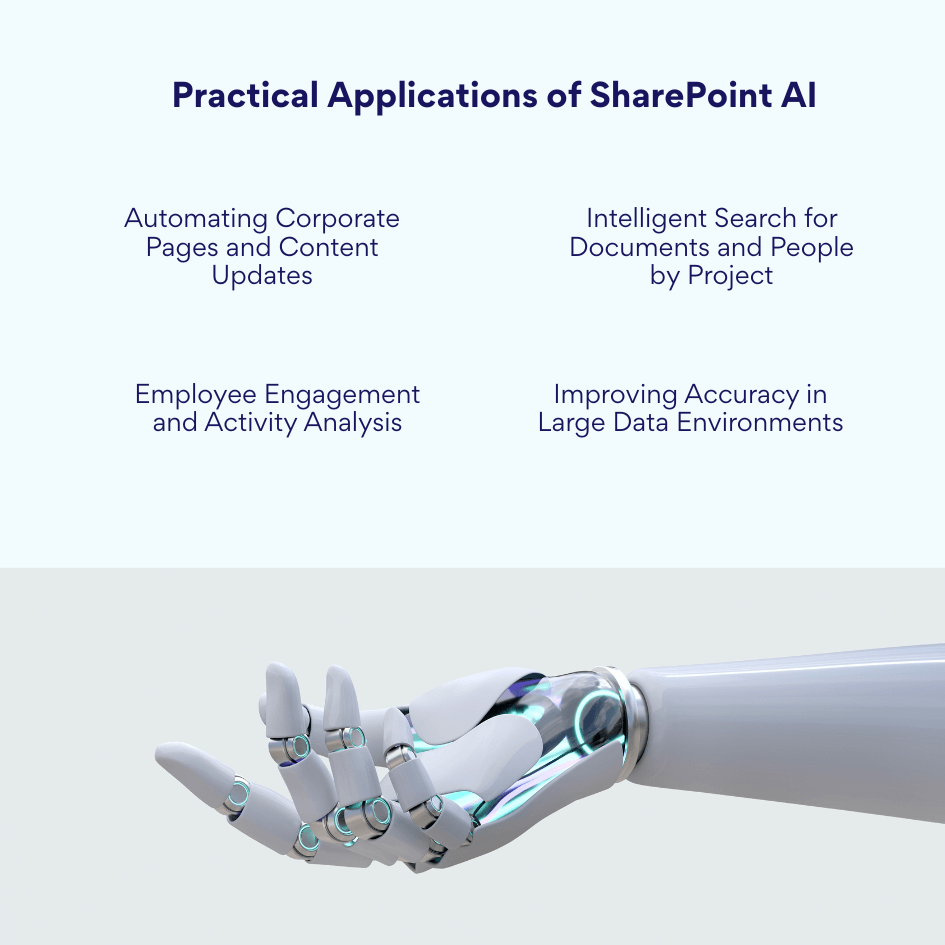
Automating Corporate Pages and Content Updates
One of the most visible improvements brought by SharePoint AI is the automation of content creation and management within corporate portals. With the help of Copilot and Microsoft Graph, organizations can automatically generate and maintain internal pages — such as news, reports, or announcements — based on real-time business data.
For example, instead of manually drafting and formatting a quarterly update, a communications manager can simply ask: “Create a page with quarterly performance results for the sales department.” Copilot for SharePoint then collects the necessary data from Excel, Teams, and related SharePoint libraries, summarizes key points, and publishes a well-structured page with consistent formatting and visuals.
As a result, organizations have a dynamic, always-relevant intranet with minimal editorial effort.
Intelligent Search for Documents and People by Project
Another powerful benefit of SharePoint AI is intelligent discovery — the ability to find exactly what (or who) you need within seconds. Modern Microsoft Search, powered by Microsoft Graph, doesn’t just look for matching keywords. It understands context by analyzing relationships between documents, people, and projects.
For instance, when a user searches for project materials, the AI engine recognizes which department the person belongs to, what tasks they’re working on, and who their collaborators are. Based on that, it suggests the most relevant files, project sites, or colleagues associated with the same tasks.
This network-aware approach transforms SharePoint AI into a knowledge navigator — helping employees instantly locate the right information and experts.
Employee Engagement and Activity Analysis
SharePoint AI also serves as an analytical tool for leaders and HR departments, providing insights into employee engagement. By using data from Microsoft Graph and built-in analytics, it helps organizations understand how staff interact with content and workplaces.
AI can analyze:
- which intranet pages are visited most frequently;
- how often employees read, comment, or share materials;
- what types of content generate the highest engagement.
If SharePoint AI detects that important reports receive low engagement, it can suggest actionable improvements — such as changing the format, adding visuals, or linking the content to related discussions in Teams.
Such analytics empower HR and internal communications specialists with data-driven insights that boost the quality of employee collaboration.
Improving Accuracy in Large Data Environments
Companies often rely on SharePoint as a central corporate data repository, containing thousands of files, reports, and spreadsheets. Managing such volumes manually can lead to inconsistencies, duplicates, or lost information. Here, SharePoint AI dramatically improves data accuracy and governance processes.
AI capabilities help to:
- identify and merge duplicate files or outdated versions;
- automatically classify documents by type, tags, or department;
- recognize and extract data from scanned documents using AI Builder;
- detect potential discrepancies or errors in content and metadata.
For example, when a new report is uploaded, SharePoint AI can compare it with existing versions, highlight differences, and suggest metadata updates to maintain consistent tagging and versioning.
Real-World Use Cases of SharePoint AI Across Business Functions
The versatility of SharePoint AI makes it applicable to nearly every department within an organization. Below are real scenarios that demonstrate how different teams benefit from AI integration in SharePoint.
HR (Human Resources)
- Intelligent candidate and document search – HR specialists use AI-powered search to locate job applications, candidate profiles, and hiring materials.
- Automated job page creation – Copilot in SharePoint can generate and publish new vacancy pages on the corporate portal.
- Employee engagement analytics – SharePoint AI helps HR monitor how employees interact with content, analysing engagement patterns and areas for improvement.
Legal Department
- Contract classification and organization – AI automatically sorts legal documents by category (NDA, partnership agreement, supplier contract).
- Version tracking and change control – The system monitors document updates, providing clear visibility into edits.
- Contract renewal notifications – SharePoint AI can alert responsible employees when agreement expiration dates approach, preventing legal risks.
Marketing
- Content analysis and material recommendations – AI links marketing resources, suggesting related campaign materials, visuals, or presentations relevant to current projects.
- Automated report and publication generation – With Copilot, marketers can quickly create campaign summaries or news articles drawing data from SharePoint libraries, Excel, and Teams discussions.
- Media library management – AI classification ensures images and videos are tagged correctly, improving retrieval and reuse across projects.
IT and Administration
- User activity monitoring and site optimization – IT teams can analyze user behavior to optimize SharePoint site architecture and navigation flow.
- Automatic access rights management – Based on employee role or department, SharePoint AI can automatically adjust permissions, maintaining security levels.
- Storage usage insights – AI-driven reports help to manage data storage and detect underused or redundant libraries.
Project Teams
- Task and progress analysis – AI interprets status updates from Planner and Teams to generate visual summaries of project performance directly within SharePoint.
- Unified data integration – Combining data from multiple sources (Planner, Teams, SharePoint) creates a complete overview of tasks and deadlines.
- Relevant document recommendations – SharePoint AI suggests documents, templates, or reports linked to ongoing initiatives, keeping project teams informed.
Chapter 4. Advantages and Limitations of SharePoint AI
AI in SharePoint is changing the way teams handle content management and everyday processes. With AI, Microsoft aims to transform SharePoint platform from a passive data repository into an intelligent assistant that proactively supports users in their work.
However, like any emerging technology, SharePoint AI comes with a set of strengths and challenges. Understanding both advantages and limitations is important for businesses to make decisions about adopting AI-powered features and to set realistic expectations about what this technology can do.
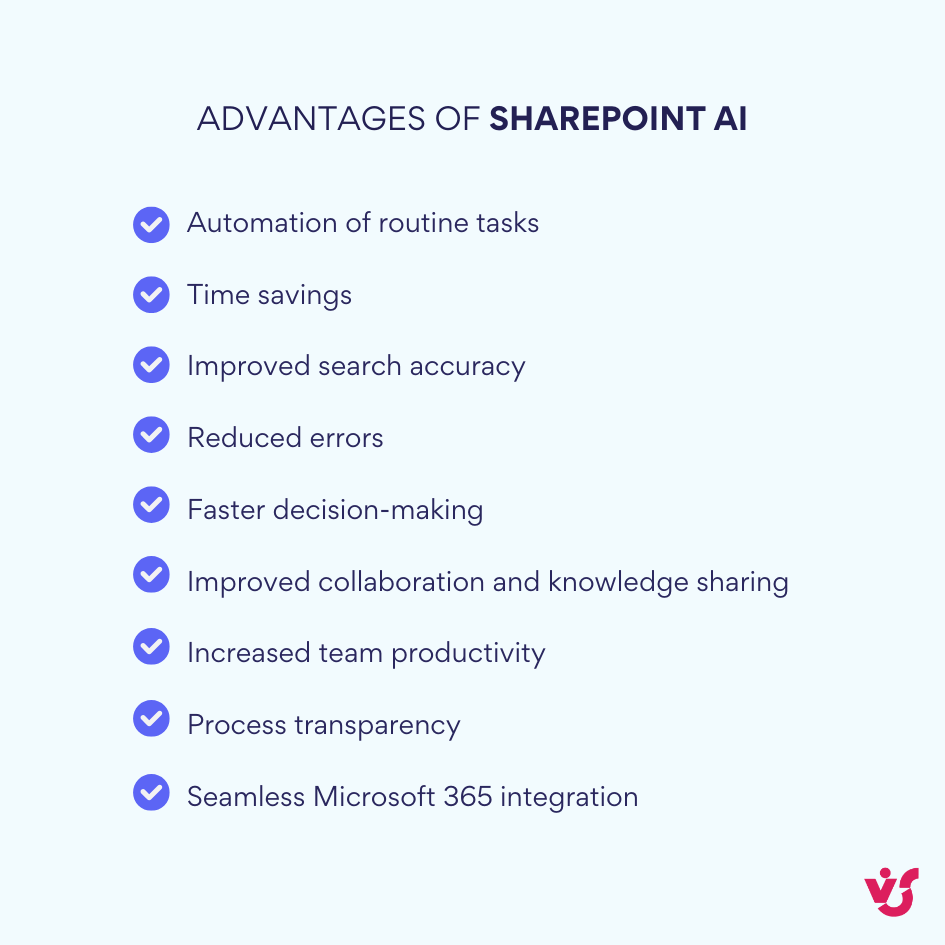
Advantages of SharePoint AI
- Automation of routine tasks — AI takes over processing, classifying, and updating documents, reducing manual workloads.
- Time savings — Automated search, content creation, and data organization streamline daily work.
- Improved search accuracy — Intelligent search and personalized recommendations allowing users to find relevant materials and experts faster.
- Reduced errors — AI enforces consistent data standards, version control, and metadata application, preventing duplication and confusion.
- Faster decision-making — By offering context-aware insights, AI helps users make decisions quickly.
- Improved collaboration and knowledge sharing — AI connects documents, projects, and contributors for better teamwork and information flow.
- Increased team productivity — Tools like Copilot and Microsoft Search lower the time spent on communication, file searching, and report preparation.
- Process transparency — Visualization of content-user-project relationships makes corporate workflows clearer and easier to manage.
- Seamless Microsoft 365 integration — SharePoint AI works closely with Copilot, Viva Insights, Power Automate, and other tools to form a unified intelligent platform.
Limitations of SharePoint AI
- Exclusive to SharePoint Online — AI features are only available in the cloud version within Microsoft 365; on-premises installations cannot utilize them.
- No native AI in on-premises SharePoint — Local deployments lack built-in machine learning and intelligent recommendations, relying on third-party extensions.
- Enterprise licensing required — Advanced functionalities like Copilot and AI Builder usually need higher-tier Microsoft 365 licenses (E3, E5, or add-ons). Microsoft 365 Copilot costs about $30 per user per month as an add-on, while SharePoint AI Agents operate on a pay-as-you-go model at $0.01 per message, making total costs unpredictable.
- Regional and language support gaps — Some AI features are not fully available in all geographies or language settings, especially outside English markets.
- Dependency on data structure and permissions — Well-organized libraries, consistent metadata, and proper access rights are essential for AI to produce relevant results.
- Security and privacy considerations — Usage may be restricted by company policies, particularly regarding sensitive data.
- Internet connectivity reliance — AI requires continuous connection to Microsoft Cloud; limited network performance affects functionality.
- Limited AI customization — Users cannot deeply train AI’s interpretative behavior beyond basic settings.
- Implementation and maintenance costs — Licensing and training can pose challenges, especially for small companies.
Chapter 5. Best Practices and Recommendations for Working with AI in SharePoint
SharePoint’s potential is fully realized only when AI technologies are set up in the right way and used consciously. Missteps can limit AI’s effectiveness and lead to frustration. Following recommendations help use SharePoint AI to its fullest while avoiding pitfalls.
Define Clear AI Implementation Goals
Start by clearly answering the question: why does your company need AI in SharePoint? Whether the focus is on automating document workflows, improving search, or analyzing data, having defined goals aligns your efforts with business priorities.
- For example, to increase process transparency, prioritize Power Automate with AI Builder.
- If rapid content generation is key, invest in Copilot within Microsoft 365.
Configure Microsoft Graph and Manage Data Access
The accuracy of AI-powered queries depend on the data Microsoft Graph can access and learn from. Make sure SharePoint content is well organized with up-to-date metadata, tags, and access permissions. AI depends on users’ permissions—if a document is restricted, AI cannot recommend it.
- Regularly review permissions and delete outdated content to keep data relevant for AI analysis.
- Structure libraries and metadata consistently so that AI delivers useful suggestions.
Use Copilot as a Collaborative Tool
AI is most effective when supporting not just individuals but team collaboration. Copilot excels at creating shared pages, meeting summaries, and reports gathering input from all the participants.
- Train your team to incorporate Copilot into project planning and content publishing.
- This reduces the load on content managers and speeds up communication.
Automate Routine Tasks While Keeping Control
AI is ideal for repetitive processes such as document classification, metadata updates, and file routing. However, AI-driven decisions should remain human-supervised, especially for sensitive data like contracts or financial reports.
- Use AI Builder and Power Automate to design semi-automated workflows.
- Always include a “human approval” step before finalizing critical documents.
Foster a Culture of AI Responsibility
Since SharePoint AI learns from company data, adhering to corporate standards and privacy policies is a must. Train employees on secure AI usage, restrict Copilot and automation on sensitive content.
- Promote awareness around data privacy and ethical AI use.
- Limit AI functions in areas involving confidential information.
Combine AI with Analytics for Strategic Insights
AI becomes even more powerful when integrated with Microsoft’s analytics tools. For example:
- Use Viva Insights to monitor employee engagement.
- Connect AI-gathered data to Power BI for rich visualizations used in SharePoint dashboards.
This integration turns raw data into business intelligence.
Test and Optimize AI Scenarios
Begin AI adoption with pilot projects in selected processes. Evaluate if AI solutions improve productivity, then scale based on results. For instance, HR may start by automating resume processing and later expand AI to training analysis.
Provide Training and Support for Employees
No AI tool creates value without proper user understanding. Offer training on Copilot and Power Automate use. Develop internal guides and appoint “AI ambassadors” to assist colleagues in adapting to new technologies.
Maintain Data and Infrastructure Currency
AI effectiveness depends on data quality and platform health. Regularly check libraries, metadata, and workflows. Update SharePoint architecture to retire outdated processes and adopt new AI features from Microsoft 365 as they are released.
Chapter 6: How to Improve SharePoint Without Using AI
Not every organization can immediately adopt Copilot or other AI tools from Microsoft, as these are only available in SharePoint Online and often require expensive licenses. However, there are reliable alternatives to improve automation and data visualization in SharePoint without using artificial intelligence.
The products from Virtosoftware enable companies to build an “intelligent” system with thoughtful user experience and rich functionality—even when AI capabilities aren’t available. These tools help in implementing effective data management through intuitive interfaces, dashboards, and reminders.
Virto Calendar App
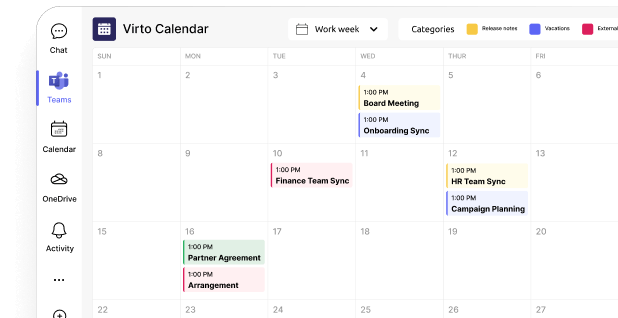
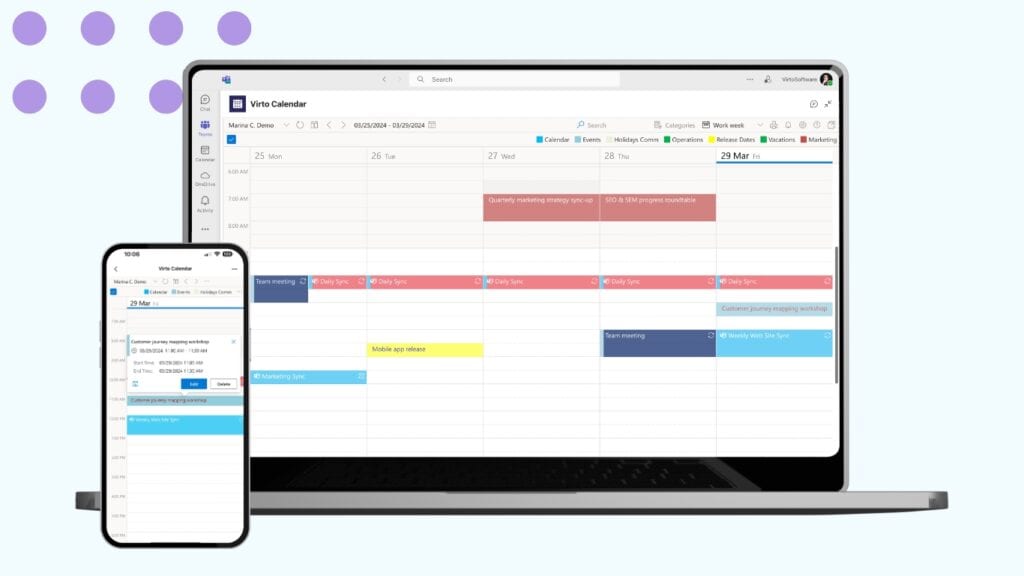
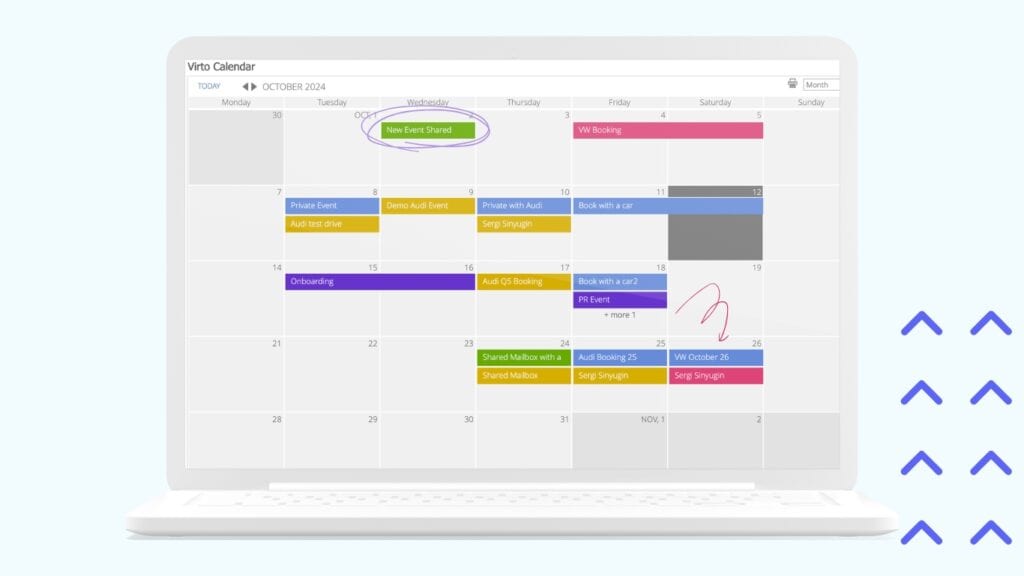
The Virto Calendar App provides an advanced calendar experience for SharePoint Online and Microsoft 365. It allows users to overlay calendar data from multiple sources including SharePoint lists, Exchange Online, Outlook, Microsoft Planner, and public calendars like iCal. Events are color-coded by calendar source and category for improved visual clarity. Users can switch between different views such as day, week, work week, month, and year, as well as a Gantt-style task view. The app supports recurring and synchronized events with data sources, integrating fully with Microsoft Teams to speed up meeting management.
Virto Kanban Board App
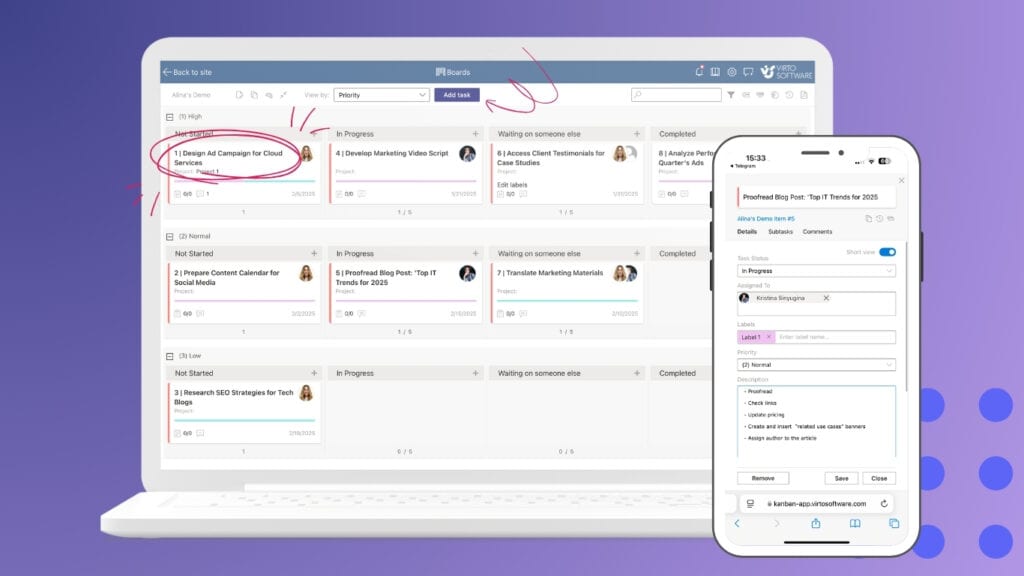
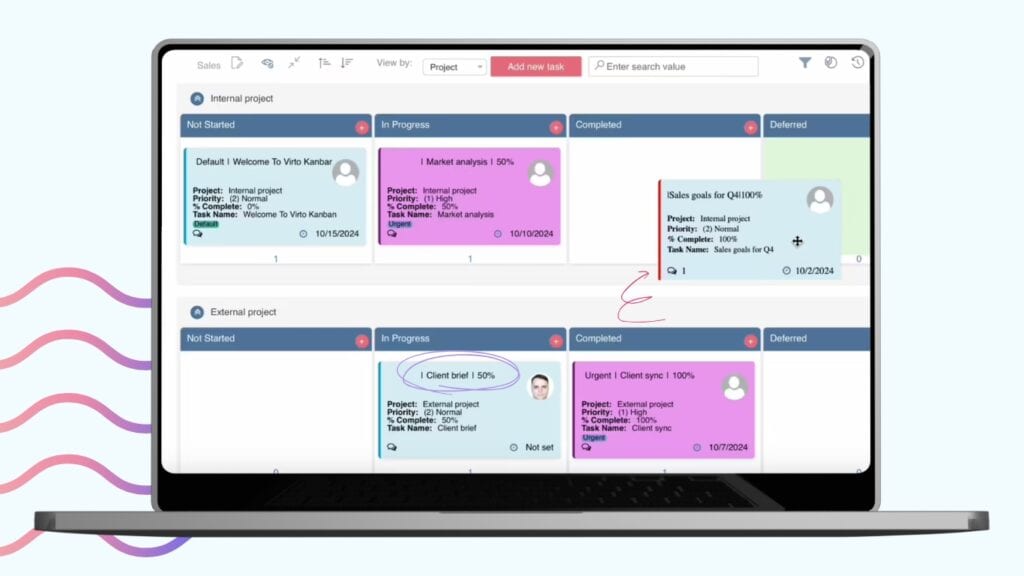
The Virto Kanban Board App converts standard SharePoint lists into intuitive visual Kanban boards designed for task and project management. It enables teams to track the status and progress of work items in a highly transparent way. Customizable columns and card layouts support focused workflows for departments that rely on agile. This tool simplifies project oversight, making it easier to identify bottlenecks and work without leaving the SharePoint environment.
Virto Alerts & Reminder App
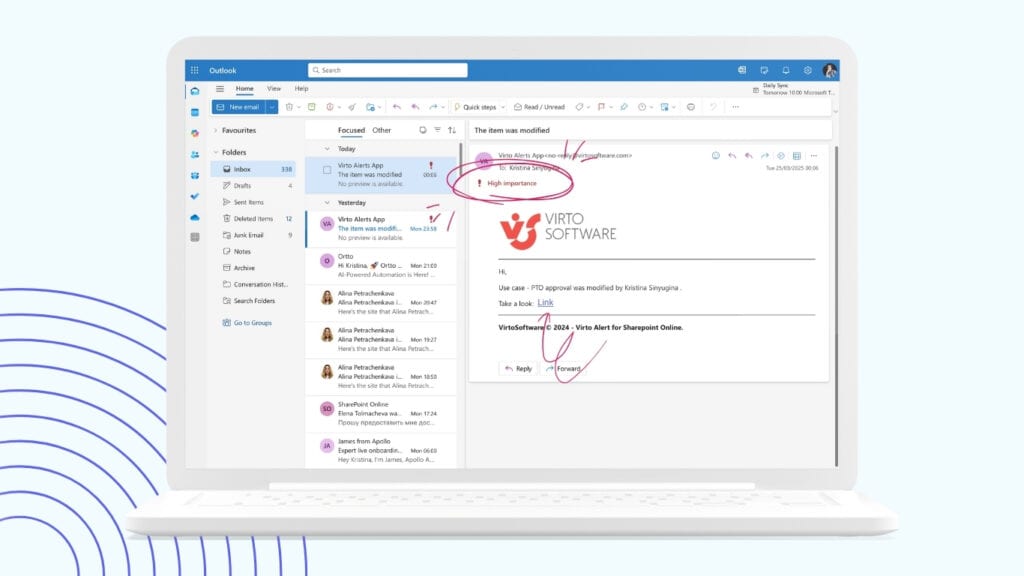
The Virto Alerts & Reminder App is a robust notification solution that lets users create reminders tied to task deadlines, document expiry dates, or events. By automating alerts, the app prevents delays. Reminders can be configured to notify individuals or groups through email or within SharePoint interfaces, ensuring nothing is missed in critical workflows.
Virto Kanban Board Web Part
Designed for SharePoint On-Premises, the Virto Kanban Board Web Part offers easy, code-free customization of visual Kanban boards. Users can set up clear task representations that map seamlessly to SharePoint lists and workflows. This solution brings the benefits of Kanban methodology to organizations regardless of deployment type.
Virto Multiple File Operations
Managing large volumes of documents becomes effortless with the Virto Multiple File Operations tool for SharePoint. It supports bulk copying, moving, replacing, and deleting files in a few clicks. This app saves time and reduces human error in content management, streamlining routine file operations that would otherwise require tedious manual effort through the SharePoint interface.

Virto Calendar Web Part (for On-Premises)
The Virto Calendar Web Part extends advanced scheduling capabilities to SharePoint On-Premises deployments. It features color-coded event categorization, customizable filters, and multilayered calendar views that aggregate data from multiple lists or sources. This calendar provides On-Premises users with modern, interactive visualization of schedules and tasks, helping teams stay aware of deadlines even without cloud capabilities.
Conclusion
The integration of artificial intelligence into SharePoint is already reshaping the way organizations manage content and collaborate, making the platform smarter and faster. AI-powered tools like Copilot, intelligent search, and automated workflows are transforming mundane tasks into quick background processes, freeing up teams to focus on higher-value work.
At the same time, even without AI capabilities, SharePoint can be significantly enhanced through powerful add-ons like those offered by Virtosoftware. These tools bring advanced visualization, planning, and content management features that elevate SharePoint’s usability and adaptability.
The future of SharePoint lies in the synergy of AI, Microsoft Graph, and customizable applications such as VirtoSoftware solutions. To unlock SharePoint’s full potential in content management and teamwork, now is the time to consider implementing VirtoSoftware Apps—taking your SharePoint environment to the next level of productivity and ease of use.