Notion vs SharePoint: Choosing the Right Tool for Your Team
Most teams don't wake up asking for another platform. They wake up needing a place where work can live, evolve, and meet policy without getting in anyone's way. Enter SharePoint vs Notion—which one fits your needs?

Most teams don’t wake up asking for another platform. They wake up needing a place where work can live, evolve, and meet policy without getting in anyone’s way. In 2025, two names dominate that practical conversation: SharePoint and Notion. One is the backbone of Microsoft 365—durable, compliant, and made for scale. The other has grown into a nimble work hub that blends documents, databases, and publishing with surprising range. Treat them as opposites and you’ll miss what each does best.
Over the past eighteen months, both products moved in meaningful ways. SharePoint tightened its link to Microsoft 365 with Copilot and stronger governance. Notion added Calendar, Sites with custom domains, Forms, Charts, and Mail, which pulled more daily activity into a single workspace. The result is a sharper division of labor: SharePoint as system of record and organizational portal; Notion as an operating canvas for teams that need to think in pages and linked databases. It’s a complementary picture if you’re willing to design it that way.
This article is written for three audiences that often talk past each other: business leaders who need accountability, IT leaders who need control, and team leads who need momentum. We’ll map clear jobs to be done—authoritative publishing, records and retention, flexible team knowledge, project execution—and show where each platform shines. We’ll also cover the connective tissue: how to keep content trustworthy, how to blend tools without spawning shadow systems, and when to let something graduate from a team workspace into a governed repository.
If you only take one idea with you, take this: you don’t have to choose a winner. You have to choose a design. The right design respects what each platform is built to do, sets clear boundaries, and gives people a straightforward path from rough work to official record. That’s how you get adoption, control, and speed—at the same time.
General overview of Notion and SharePoint
Notion and SharePoint operate within different ecosystems but address overlapping challenges in knowledge management and team collaboration.
Notion functions as a cloud-based workspace that combines note-taking, database management, task coordination, and project planning. The platform serves individuals and small-to-medium teams with an emphasis on flexibility and rapid setup. Users can quickly establish workspaces and customize them for specific workflows without technical expertise or lengthy implementation periods. Since 2024, Notion added Calendar, Sites (with custom domains), Forms, Charts, and in 2025 Mail, extending it beyond docs and databases into scheduling, simple websites, data capture, and email.
SharePoint represents Microsoft’s enterprise-focused approach to content management and internal portals. Built for larger organizations requiring structured access controls, the platform integrates deeply with Microsoft 365 to support document collaboration across Word, Excel, and PowerPoint. SharePoint handles business process automation and maintains the security standards expected by corporations, government agencies, and regulated industries.

💡Learn more about SharePoint in our dedicated articles:
- SharePoint Site Types Explained: Choosing the Right Site for Your Needs
- Understanding SharePoint Subsite: From Basics to Implementation
- Intranet SharePoint: Building Process and Use Cases
- Optimize Your Business with SharePoint Document Management
Key features
Notion’s core capabilities include:
- Knowledge base creation and maintenance: Companies structure internal documentation, procedures, and databases while maintaining easy updates and cross-references between related content.
- Note-taking and documentation: Teams create shared notes, meeting minutes, and project records that remain accessible and searchable across the organization.
- Task organization through boards: Built-in Kanban functionality enables project management and progress tracking without requiring separate tools.
- Database flexibility and templates: Ready-made templates support common workflows like project planning and content calendars, while custom databases adapt to specific team requirements.
- Real-time collaboration: Multiple users edit documents simultaneously, leave contextual comments, and share pages with granular permission controls.
- Calendar: Connects Google Calendar and displays Notion database pages alongside events, supporting conferencing integrations including Microsoft Teams.
- Sites: Publish pages with branding, SEO optimization, and Google Analytics integration, with custom domains available as a paid enhancement.
- Forms and Charts: Native forms write directly to databases, while one-click charts visualize data from any database without external tools.
- Mail: Generally available as of April 15, 2025, Gmail-based at launch with Calendar scheduling integration, though Outlook support remains limited at the time of writing.
SharePoint’s primary features encompass:
- Enterprise content management: Store, organize, and search files with sophisticated access rights systems that support complex organizational hierarchies.
- Internal portal development: Companies build comprehensive corporate sites and departmental workspaces that serve as centralized information hubs.
- File storage and collaboration: Integration with OneDrive and Teams provides document access and simultaneous editing capabilities across the Microsoft ecosystem.
- Process automation through Power Automate: Configure business workflows including document approvals, notifications, and task routing without custom development.
- Microsoft 365 integration: Deep connections with Teams, Outlook, Excel, and other Microsoft applications create a unified productivity environment for large organizations.
- Copilot in SharePoint: AI-assisted page creation and content summarization, with SharePoint Premium (Advanced Management) enhancing governance capabilities.
- SharePoint Embedded: Generally available as of May 21, 2024, this headless, metered service enables custom application development on Microsoft 365 content, including Copilot and Purview features.
| Area | Notion (2024–2025) | SharePoint (2024–2025) | Why it matters |
| New surface | Calendar, Sites (custom domains), Forms, Charts, Mail (Gmail-first) | Copilot for SharePoint, Advanced Management (Premium), SharePoint Embedded (GA, PAYG) | Notion covers more daily work; SharePoint speeds compliant publishing and opens a headless dev path. |
| Publishing | Public Sites with branding + basic SEO | Intranet hubs, audience targeting inside M365 | Choose Sites for lightweight external docs; use SharePoint for governed portals. |
| Governance | SSO, SCIM, verified pages, EU data residency, HIPAA (Enterprise + BAA) | Labels, retention, eDiscovery, DLP, tenant-wide audit | Anchor records in SharePoint; let Notion run fast-moving team knowledge. |
👉 Notion vs SharePoint: which is better? Neither platform is inherently better—they excel in different contexts and serve different organizational needs. Notion wins for creative teams, startups, and organizations prioritizing speed and flexibility, while SharePoint dominates when enterprises need comprehensive governance, compliance capabilities, and deep Microsoft 365 integration. The “better” choice depends entirely on your team size, regulatory requirements, existing technology investments, and whether you value rapid deployment over structured processes.
Is there a Microsoft equivalent of Notion?
The closest Microsoft equivalents are Microsoft Loop (flexible canvases and components embedded within Teams, Outlook, and Word) and SharePoint for enterprise content and governance. Loop provides canvas-style collaboration similar to Notion’s flexible page structure, though it lacks Notion’s database capabilities. SharePoint remains the system of record for enterprise content management, making it fundamentally different from Notion’s approach to information organization.
💡Learn more about Microsoft Loop: What Is Microsoft Loop? Features, Benefits, and How to Use It
Key Differences between Notion and SharePoint
Understanding each platform’s strengths and limitations helps organizations align their tool selection with realistic expectations and specific requirements.
Focus and design philosophy
Notion prioritizes flexibility and adaptability above all else. The platform excels when teams need to quickly create, modify, and restructure their information systems. This makes it particularly valuable for creative teams, startups, and dynamic projects where requirements shift frequently. Users can transform a simple page into a complex database, then link it to task boards and calendars without predetermined workflows or administrative oversight.
SharePoint operates with enterprise standardization as its core principle. The platform assumes organizations need consistent processes, audit trails, and compliance frameworks. Every feature reflects this enterprise-first mentality, from granular permission systems to detailed versioning controls. SharePoint succeeds when companies require predictable, repeatable processes that scale across large user bases.
Ecosystem integration
Notion functions as an independent SaaS application accessible through cloud subscriptions. This independence allows rapid feature development and cross-platform compatibility, but limits deep integration with existing enterprise systems. The platform connects well with popular productivity tools but doesn’t embed into complex corporate infrastructure.
SharePoint exists as a foundational component of Microsoft 365, creating natural synergies with Teams, OneDrive, Outlook, and hundreds of other Microsoft services. Organizations already invested in the Microsoft ecosystem gain immediate value from SharePoint’s native integrations. Microsoft now offers Loop for canvas-style collaboration, but databases and knowledge operations remain Notion’s strength. Loop provides flexible canvases and components embedded across Microsoft 365, making it a closer analogue to Notion than traditional SharePoint, though it still lacks Notion’s database capabilities.
Scalability and user management
Notion scales effectively for many large teams, though organizational structures requiring complex hierarchies, detailed reporting chains, and sophisticated administrative controls may find governance and compliance depth (data loss prevention, retention labels, legal hold) stronger in Microsoft 365 and SharePoint environments.
SharePoint scales from small departments to global organizations supporting tens of thousands of users. The platform accommodates intricate organizational hierarchies, geographic distributions, and regulatory requirements that smaller tools cannot manage. This scalability comes with corresponding complexity in setup and maintenance.
Implementation and administration
Notion emphasizes user empowerment through intuitive interfaces. Any team member can establish knowledge bases, create task boards, or build internal portals within hours. This democratic approach accelerates adoption but may create inconsistencies in larger organizations without governance frameworks.
SharePoint requires deliberate planning, professional implementation, and ongoing administrative support. The platform’s power demands careful configuration to align with company processes and security requirements. While this complexity enables sophisticated functionality, it also necessitates dedicated resources and technical expertise.
Comparison overview
| Aspect | Notion | SharePoint |
| Primary purpose | Flexible workspace and knowledge management | Enterprise content management and portals |
| Document management | Page-based with simple sharing | Advanced versioning, approval workflows, lifecycle management |
| Security and compliance | SSO (SAML), SCIM, HIPAA support with BAA, EU data residency, page verification | Enterprise-grade security, DLP, retention policies, eDiscovery |
| Interface | Clean, intuitive, block-based editing | Feature-rich but complex, requires training |
| Integrations | Popular SaaS tools, Teams conferencing via Calendar, limited enterprise systems | Deep Microsoft 365 integration, extensive enterprise connectivity |
| Cost structure | Predictable per-user pricing | Variable based on Microsoft 365 licensing and add-ons |
The choice between these platforms depends heavily on organizational scale, existing technology investments, and regulatory requirements. Small teams seeking rapid deployment and flexible structures will find Notion more appropriate, while enterprises requiring comprehensive governance and Microsoft ecosystem integration should prioritize SharePoint.

👉 Notion vs SharePoint: what’s the main difference? Notion prioritizes flexibility and rapid setup for teams that need to quickly adapt their information systems, while SharePoint focuses on enterprise governance and standardized processes for large organizations. Notion operates as an independent workspace where users can transform pages into databases and link everything together without administrative oversight, whereas SharePoint functions as part of Microsoft 365 with sophisticated access controls and compliance frameworks. The fundamental divide comes down to adaptability versus accountability.
Advantages and Disadvantages of Notion and SharePoint
Understanding each platform’s strengths and limitations helps organizations align their tool selection with realistic expectations and specific requirements.
Notion advantages
Notion’s strength lies in its user-centric design and flexible architecture that adapts to diverse team needs without requiring technical expertise or lengthy setup processes:
- Intuitive interface and rapid adoption: The clean, uncluttered design allows users to become productive immediately without extensive training. New team members typically master basic functions within their first session, reducing onboarding friction significantly.
- Flexible information architecture: Users create interconnected pages, databases, wiki sections, and task boards that adapt to changing project needs. This structural flexibility supports diverse working styles and evolving organizational requirements without requiring administrative intervention.
- Unified workspace functionality: A single tool handles note-taking, project management, knowledge documentation, task lists, and content planning. Teams avoid context switching between multiple applications, maintaining focus and reducing cognitive overhead.
- Minimal setup requirements: Organizations can implement Notion without technical specialists or lengthy configuration periods. Teams begin collaborating productively within hours rather than weeks or months.
- Real-time collaboration capabilities: Multiple users see changes instantly and can leave contextual comments directly within documents. Version conflicts become rare due to the platform’s collaborative architecture.
- Cross-platform accessibility: Consistent functionality across web browsers, Windows, macOS, iOS, and Android ensures team members can contribute regardless of their device preferences.
- Sites with custom domains: Simple external documentation and handbooks can be published with professional branding and custom URLs, eliminating the need for separate website tools.
- Calendar and Mail integration: Unified scheduling and inbox management within the workspace, with scheduling features accessible through simple commands like /schedule. Calendar connects with Microsoft Teams for conferencing links.
💡 Learn more about different scheduling apps here:
- Best Microsoft Scheduling Software for Enhanced Productivity
- Elevate Your Enterprise Virtual Meetings with Leading Software Solutions
- Exploring Meeting Room Booking Systems and Software Tools: A Research Guide
Notion disadvantages
Despite significant improvements in enterprise features, Notion faces limitations when organizations require sophisticated governance, complex integrations, or enterprise-scale administrative controls:
- Enterprise document management limitations: Complex approval workflows, automated retention policies, and sophisticated version control remain beyond Notion’s capabilities. Organizations requiring detailed audit trails and regulatory compliance may find these gaps problematic.
- Permissions are page and database-centric: While Notion offers SSO (SAML), SCIM, audit capabilities, verified pages, HIPAA support (Enterprise with BAA and required configuration), and EU data residency options, SharePoint still leads on enterprise governance including data loss prevention, retention policies, and eDiscovery capabilities.
- Native SharePoint and M365 integration remains deeper: Notion offers Teams conferencing via Calendar and a Teams AI Connector (beta), but Outlook and Office 365 workflows typically require third-party automation tools like Zapier, Make, or Power Automate. No native SharePoint synchronization exists.
- Limited enterprise system integration: Notion connects well with popular SaaS applications but lacks deep integration with complex ERP, CRM, or legacy corporate systems that larger organizations depend upon.
- Governance depth: Although Notion has significantly improved its enterprise features, comprehensive governance capabilities like advanced data loss prevention, retention labels, and legal hold functionality remain stronger in Microsoft 365 and SharePoint environments.
| Need | Use Notion when… | Use SharePoint when… |
| Knowledge base | You want fast iteration with linked databases and inline context. | You need multilingual hubs, targeted audiences, and long-term retention. |
| Project execution | Teams work from docs + boards + timelines in one surface. | Workflows must feed Power Automate/Power Apps and inherit labels. |
| External docs | You want branded Sites and simple SEO without a separate CMS. | External access must obey guest policies and conditional access. |
| Compliance | Team-level controls are sufficient (SSO/SCIM/verified pages/EU residency). | You require DLP, legal hold, sensitivity labels, and eDiscovery. |
SharePoint advantages
SharePoint’s enterprise-first architecture provides comprehensive tools for large-scale content management, security, and integration within the Microsoft ecosystem:
- Comprehensive customization options: Organizations can configure portals, document libraries, and workflows to match specific business requirements without compromising functionality or security standards.
- Native Microsoft 365 integration: File access, collaboration tools, and communication features work within a unified ecosystem, eliminating integration challenges and providing consistent user experiences across applications.
- Advanced process automation: Built-in workflow capabilities handle complex approval processes, automated notifications, deadline reminders, and task routing without requiring custom development or third-party tools.
- Enterprise security and compliance: The platform meets international standards including GDPR and HIPAA, providing data loss prevention, retention policies, eDiscovery capabilities, and detailed audit logging required by regulated industries. Microsoft 365 Copilot supports HIPAA when properly configured, and EU Data Boundary caveats don’t apply to web search functionality.
- Sophisticated document management: Version control, organization-level access rights, document lifecycle management, and automated retention policies support complex content governance requirements.
- Unlimited scalability: The architecture supports organizations ranging from small departments to global enterprises with hundreds of thousands of users while maintaining performance and security standards.
- Copilot integration: AI-assisted page creation and content summarization accelerate content workflows, while SharePoint Premium (Advanced Management) improves governance and readiness for AI-powered features.
- SharePoint Embedded capabilities: Generally available as of May 21, 2024, with pay-as-you-go pricing, this headless service enables custom line-of-business and ISV applications built on Microsoft 365 content with integrated Copilot and Purview features.
SharePoint disadvantages
SharePoint’s enterprise capabilities come with corresponding complexity that can create barriers for smaller teams or organizations seeking rapid deployment and intuitive user experiences:
- Implementation complexity: Full deployment requires careful planning, technical expertise, and often external consulting support. Organizations frequently underestimate the time and resources needed for successful implementation.
- Higher total cost of ownership: Licensing fees, implementation costs, ongoing administrative overhead, and required technical support create significant expenses, particularly challenging for smaller organizations with limited IT budgets.
- Interface complexity: The feature-rich environment can overwhelm new users, requiring structured training programs and ongoing support to achieve productive adoption across teams.
- Extended deployment timeline: Realizing SharePoint’s full potential demands extensive planning, systematic configuration, comprehensive testing, and user training that can span months rather than weeks.
- Feature redundancy for small teams: Many enterprise-focused capabilities provide little value to small organizations, creating unnecessary complexity and cost without corresponding benefits.
The platform selection ultimately depends on matching these characteristics with organizational priorities. Teams prioritizing speed, flexibility, and simplicity will find Notion’s advantages compelling, while enterprises requiring comprehensive governance, deep Microsoft integration, and sophisticated compliance capabilities will benefit more from SharePoint’s comprehensive but complex feature set.
Notion and SharePoint Use Cases
Examining real-world applications reveals how each platform serves different organizational contexts and team structures most effectively.
When Notion excels
Notion performs best in environments that prioritize flexibility, rapid adaptation, and collaborative knowledge building over rigid organizational structures.
Personal organization and productivity
Individual contributors use Notion for comprehensive personal management systems. The platform consolidates notes, research materials, idea capture, to-do lists, and goal tracking into unified dashboards. Knowledge workers particularly appreciate the ability to create interconnected personal wikis that grow organically over time.
Knowledge management and documentation
Organizations build sophisticated internal knowledge bases using Notion’s flexible page structure. Companies store procedures, FAQs, onboarding materials, and process documentation with easy cross-referencing between related topics. Verified pages help ensure content accuracy and authority within larger organizations.
Creative team collaboration
Design agencies, marketing teams, and content creators leverage Notion’s visual flexibility for project coordination. Teams manage campaign briefs, creative assets, feedback cycles, and approval processes within shared workspaces. The Calendar integration with Microsoft Teams conferencing supports hybrid collaboration, while the database functionality enables content calendars and editorial workflows.
Startup and small business operations
Growing companies use Notion as their operational backbone before formal enterprise systems become necessary. Startups coordinate product development, track customer feedback, manage hiring processes, and maintain company handbooks. The platform scales with small teams while remaining cost-effective and easy to modify.
External-facing documentation
Organizations publish professional documentation using Notion Sites with custom domains. Companies create customer handbooks, API documentation, and knowledge bases with branding, SEO optimization, and Google Analytics integration, eliminating the need for separate website tools.
Unified communication and scheduling
Teams benefit from Notion Mail’s Gmail integration combined with Calendar functionality for scheduling via /schedule commands. This integration particularly serves teams wanting consolidated workspace management, though Outlook support remains limited at launch.
Project management for flexible teams
Agile teams and remote workers coordinate projects using Notion’s Kanban boards, task databases, and milestone tracking. The AI Connector for Microsoft Teams (beta) enhances collaboration for teams already using Microsoft’s communication tools. The platform adapts to changing project requirements without forcing rigid methodologies.
Notion proves especially valuable for organizations prioritizing rapid implementation and adaptability over comprehensive governance. Creative agencies, educational institutions, startups, and distributed teams benefit most from its flexibility and ease of use.
| Use case | Core blocks | Optional add-ons |
| Product launch hub | Databases (tasks, assets), Calendar timeline | Forms for intake, Charts for KPIs, Site for public notes |
| Team wiki | Pages + relations/rollups | Verified pages for canonical content |
| Content operations | Kanban DB + editorial calendar | Charts for pipeline health, Calendar for reviews |
| Partner handbook | Pages | Site with custom domain and basic SEO |
When SharePoint dominates
SharePoint proves most valuable in scenarios requiring enterprise-grade governance, compliance frameworks, and sophisticated content management at scale.
Enterprise content management
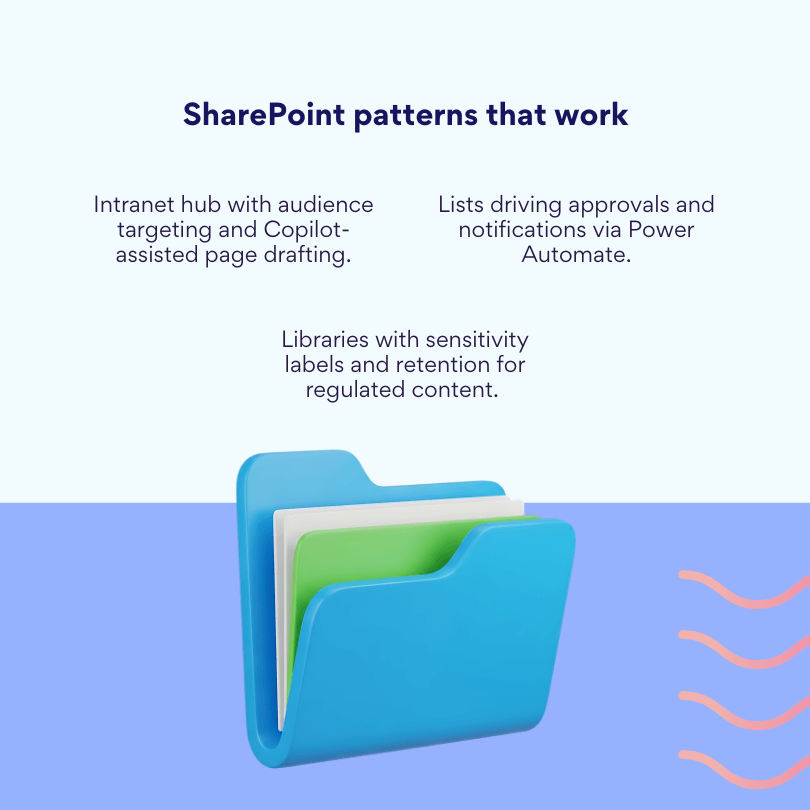
Large organizations manage thousands of documents while maintaining version control, access rights, and compliance requirements. SharePoint handles complex document lifecycles, automated retention policies, and detailed audit trails necessary for regulated industries. Legal departments, financial services, and healthcare organizations depend on these capabilities.
AI-powered content creation and governance
Organizations leverage Copilot in SharePoint for page creation and content summarization to accelerate content workflows. SharePoint Premium (Advanced Management) provides enhanced governance features that prepare organizations for AI-assisted productivity while maintaining security and compliance standards.
Custom application development
Companies build specialized business applications using SharePoint Embedded (generally available May 21, 2024). This pay-as-you-go service enables custom line-of-business and ISV applications built on Microsoft 365 content with integrated Copilot and Purview features, supporting complex organizational requirements.
Corporate intranet development
Companies create comprehensive internal portals serving as central hubs for employee communications, policy documentation, and organizational resources. These intranets integrate with existing systems while providing personalized experiences based on department, role, and location.
Business process automation
Organizations streamline complex workflows including document approvals, expense processing, employee onboarding, and compliance reporting. Power Automate integration enables sophisticated process chains that route tasks, send notifications, and update systems automatically.
Microsoft 365 ecosystem integration
Companies already invested in Teams, Outlook, OneDrive, and other Microsoft services gain immediate value from SharePoint’s native integration. Employees access documents directly from Teams chats, sync files with OneDrive, and collaborate within familiar Microsoft interfaces.
Compliance-heavy industries
Pharmaceutical companies, financial institutions, and government agencies require detailed documentation, approval processes, and audit capabilities. SharePoint provides the governance frameworks, retention policies, and eDiscovery tools necessary for regulatory compliance. Microsoft 365 Copilot’s HIPAA support when properly configured serves healthcare organizations with AI assistance while maintaining compliance.
Strategic considerations
Organizations increasingly recognize that platform selection involves more than feature comparisons, requiring careful evaluation of integration realities and long-term strategic alignment.
Hybrid implementation approaches
Forward-thinking organizations combine both platforms strategically. Teams use Notion for operational knowledge management, creative collaboration, and flexible project coordination while relying on SharePoint for official document storage, compliance requirements, and Microsoft 365 integration.
Integration realities
While native SharePoint synchronization doesn’t exist, organizations can leverage Notion Calendar’s Microsoft Teams conferencing integration and the Teams AI Connector (beta) for improved collaboration. Outlook and Office 365 workflows typically require third-party automation through Zapier, Make, or Power Automate.
Decision framework
If you need AI-assisted page creation and strict retention/sensitivity labeling, SharePoint with Copilot and Purview provides the optimal solution. If you need flexible database-driven wikis and projects with verified pages, Notion excels. The choice often depends on existing Microsoft investments and compliance requirements rather than feature comparisons alone.
Notion and SharePoint Integration and Data Migration
Organizations frequently need to connect these platforms with existing systems or migrate between them as requirements evolve. Understanding integration possibilities and migration strategies helps teams make informed decisions about platform adoption.
| Scenario | Native today | Practical path |
| Notion ↔ SharePoint sync | No | Use Power Automate/Zapier/Make for event-based bridges; keep a single source of truth. |
| Meetings in Notion with Teams links | Yes (via Notion Calendar) | Use Calendar conferencing for Teams; store recordings/transcripts in M365. |
| Outlook/Exchange mail in Notion | Limited (Mail launched Gmail-first) | Keep Outlook as primary; route notifications via bridges if needed. |
| Teams collaboration with Notion content | Emerging (AI connector beta) | Link/embeds; keep records in SharePoint libraries. |
Integration capabilities: Can you sync Notion with Microsoft? Can Notion integrate with SharePoint?
Direct integration between Notion and Microsoft 365 (including SharePoint, Outlook, and Teams) remains limited. No native SharePoint synchronization exists, meaning organizations cannot automatically sync documents, metadata, or user permissions between the platforms. This fundamental limitation requires careful planning for organizations wanting to use both systems.
However, recent developments provide some connectivity options. Notion Calendar can add Microsoft Teams conferencing links, enabling hybrid teams to schedule meetings that bridge both platforms. Additionally, Notion’s AI Connector for Microsoft Teams (beta) offers experimental integration capabilities, though functionality remains limited compared to native Microsoft ecosystem tools.
For broader integration needs, organizations typically rely on third-party automation platforms. Zapier, Make (formerly Integromat), and Microsoft’s own Power Automate can establish connections between Notion and Microsoft 365 services. These integrators enable partial data sharing such as task synchronization, calendar events, and notification routing, though they require additional setup and don’t provide the deep interoperability that native integrations offer.
Practical integration scenarios
Document workflow separation: Teams can use SharePoint as the authoritative document repository while leveraging Notion for project planning, meeting notes, and collaborative editing. Documents move between systems manually or through automated workflows at specific project milestones.
Meeting and scheduling coordination: Notion Calendar’s Teams conferencing integration allows teams to schedule meetings with proper video conferencing links while maintaining project context within Notion workspaces. Meeting notes and follow-up tasks can remain in Notion while official records transfer to SharePoint.
Notification and task routing: Power Automate workflows can monitor SharePoint document libraries and create corresponding Notion database entries when new files appear. Similarly, Notion task completions can trigger SharePoint workflow approvals or send Outlook notifications to stakeholders.
Hybrid knowledge management: Organizations often maintain operational documentation and creative briefs in Notion while storing final deliverables, compliance documents, and archived materials in SharePoint. Clear content lifecycle policies prevent confusion about information location and authority.
Integration limitations to consider
Notion Mail operates with Gmail focus at general availability, meaning Outlook integration requires additional configuration or third-party automation. Organizations heavily invested in Exchange and Outlook workflows may find this limitation significant.
User authentication: While Notion supports SAML SSO integration, user provisioning and deprovisioning between platforms requires manual coordination or custom automation. Organizations cannot rely on unified identity management across both systems without additional infrastructure.
Permission synchronization: Access rights and security policies don’t transfer between platforms automatically. Teams must maintain separate permission structures and manually coordinate access changes across both systems.
Data migration strategies
Moving content between platforms requires systematic planning to preserve data integrity, maintain user accessibility, and minimize workflow disruption during the transition process.
Transferring content from Notion to SharePoint
Successfully migrating from Notion to SharePoint involves multiple phases, from initial content preparation through final optimization and user training.
Content preparation and export
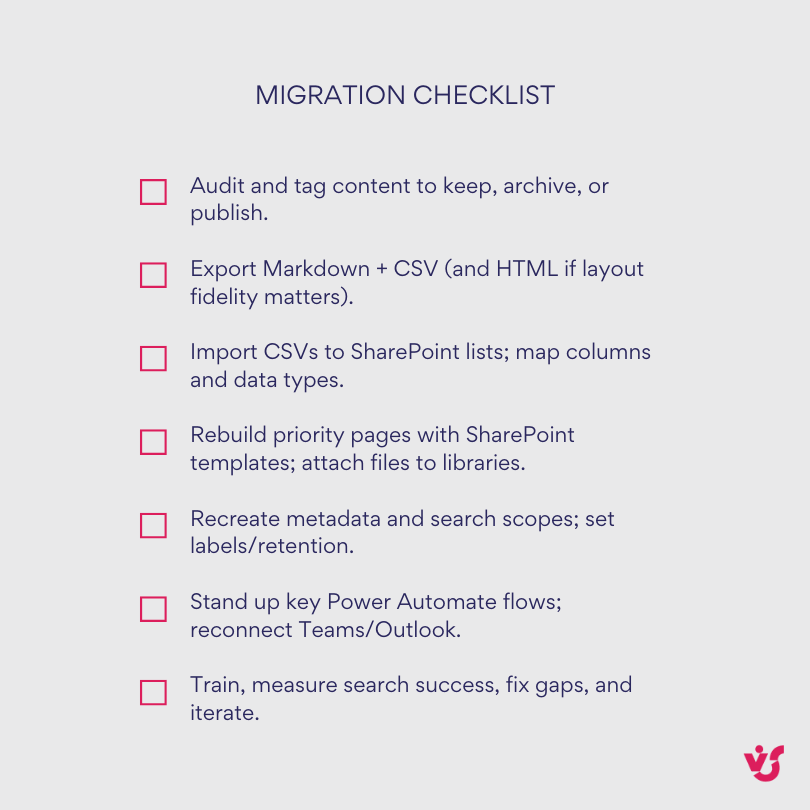
Begin by auditing Notion content to determine migration scope. Identify which pages, databases, and knowledge bases require preservation versus archival. Use Notion’s built-in export functionality to create migration packages:
Markdown + CSV format provides optimal compatibility for text content and database structures. This format preserves basic formatting while enabling automated processing of tabular data.
HTML export maintains page structure, embedded content, and visual formatting but requires more complex processing during SharePoint import.
Organize exported files by content type (documentation, project data, meeting notes) to streamline the import process and maintain logical groupings within SharePoint.
SharePoint import and restructuring
Document library creation: Establish SharePoint document libraries that mirror Notion’s organizational structure. Upload HTML pages and attachments while preserving folder hierarchies that team members recognize.
List and database conversion: Transform CSV exports from Notion databases into SharePoint lists using the platform’s import functionality. Map Notion properties to SharePoint columns, ensuring data types align correctly (dates, numbers, choice fields).
Page and wiki migration: Convert Notion pages into SharePoint pages using available templates or custom page layouts. While automated conversion tools exist, manual review ensures formatting, images, and embedded content transfer correctly.
Metadata and search optimization
Custom properties and tagging: Recreate Notion’s tagging and categorization systems using SharePoint’s metadata architecture. Establish managed metadata terms that enable consistent categorization across migrated content.
Search configuration: Configure SharePoint search to index migrated content effectively. Create custom search scopes and result templates that help users locate information using familiar keywords and categories.
Permission mapping and access control
User group establishment: Create SharePoint security groups that mirror Notion workspace permissions. Map individual user access rights to appropriate SharePoint permission levels (read, contribute, full control).
Content-level security: Apply item-level permissions where Notion provided granular access control. Document these permission mappings for future reference and troubleshooting.
Workflow and automation setup
Process recreation: Identify Notion workflows (task assignments, approval processes, notification routing) and recreate them using Power Automate or SharePoint’s built-in workflow capabilities.
Integration establishment: Connect SharePoint to existing Microsoft 365 services (Teams, Outlook, Planner) to restore collaborative functionality that teams relied upon in Notion.
Migration considerations for Notion Sites
SEO and external access: When migrating from Notion Sites with custom domains, capture SEO metadata, URL structures, and analytics configurations separately. SharePoint’s publishing capabilities differ significantly from Notion Sites, potentially requiring alternative hosting solutions for external-facing content.
Custom domain handling: Plan alternative approaches for external documentation previously hosted on Notion Sites, as SharePoint’s external sharing model operates differently from Notion’s public page publishing.
Post-migration optimization
User training and adoption: Conduct training sessions that highlight differences between Notion and SharePoint workflows. Create quick reference guides that map familiar Notion actions to SharePoint equivalents.
Performance monitoring: Monitor system performance and user feedback during the initial weeks after migration. Address access issues, search problems, and workflow disruptions promptly to maintain productivity.
Iterative improvement: Gather user feedback and refine SharePoint configurations based on actual usage patterns. Many organizations require several adjustment cycles before achieving optimal productivity in the new environment.
Bidirectional considerations
Organizations moving from SharePoint to Notion face different challenges, primarily around recreating enterprise governance features and complex permission structures. Export SharePoint content using standard formats (CSV for lists, document downloads for files) while acknowledging that advanced features like retention policies, approval workflows, and detailed audit trails don’t transfer directly to Notion’s simpler architecture.
The migration success ultimately depends on realistic expectations about feature parity and careful change management to help teams adapt to different collaboration paradigms.
👉 SharePoint vs Notion: how do I choose the best one for my needs? Start by evaluating your organization’s scale, compliance requirements, and existing technology ecosystem rather than comparing features. Choose Notion if you have under 50 users, need productivity within hours, and can work with basic security controls, or select SharePoint if you require HIPAA/GDPR compliance, have heavy Microsoft 365 investments, and can invest weeks in proper implementation. Consider a hybrid approach where Notion handles operational knowledge and creative work while SharePoint manages official documents and compliance requirements.
How to Improve SharePoint Work with VirtoSoftware
Organizations seeking to maximize SharePoint’s potential often discover that third-party applications can address specific workflow challenges more effectively than native tools alone. VirtoSoftware provides over 40 industry-proven apps designed to enhance teamwork in Microsoft-centric organizations, offering comprehensive productivity tools for both SharePoint Online and On-Premise environments.
Virto SharePoint Online and Microsoft 365 products
SharePoint serves as more than document storage—it functions as a flexible ecosystem that organizations can expand significantly through specialized applications. VirtoSoftware solutions help companies accelerate daily processes, improve data organization, and simplify employee interactions.
Core productivity applications for SharePoint Online
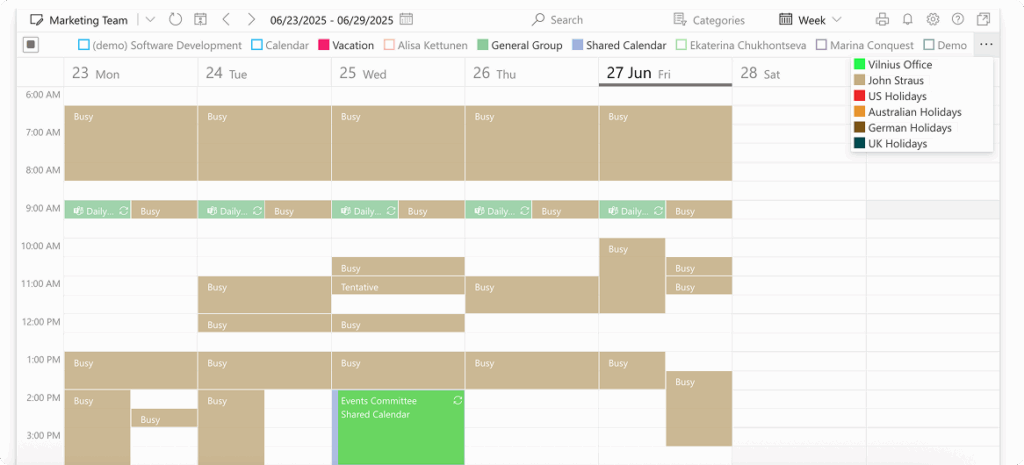
Merge all calendars in one place
Try Virto Calendar to Sync all data
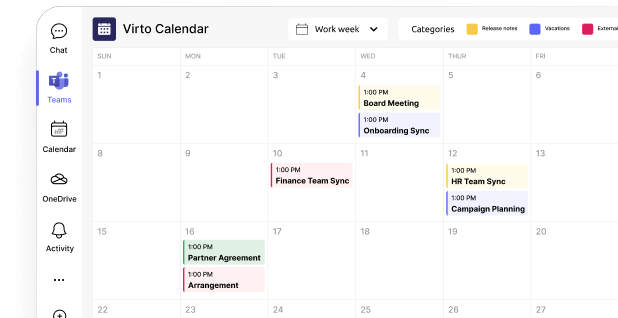
Virto Calendar App: This application centralizes scheduling by merging multiple calendars from different sources, including SharePoint lists and libraries, Outlook, Planner, Google Calendar, iCal, and Apple Calendars. The Calendar Overlay seamlessly integrates SharePoint, Outlook, meeting rooms, and online calendars into one intuitive, color-coded view, making event and appointment management more efficient. Organizations benefit from unified calendar experiences that eliminate the need to check multiple systems for scheduling conflicts.

Virto Kanban App
Try Virto Calendar to Sync all data
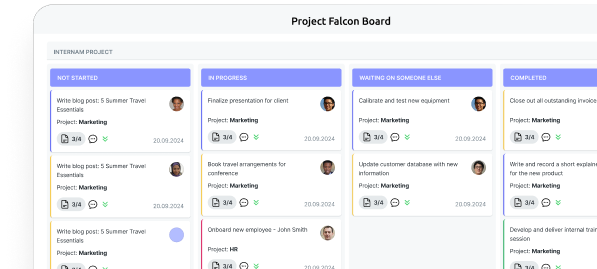
Virto Kanban Board App: This tool revolutionizes task and project management by enabling teams to display Kanban boards directly within Microsoft Teams channel tabs or SharePoint Sites, eliminating constant context switching. Teams can use ready-to-use templates to start new projects in less than 60 seconds, with customizable boards featuring swimlanes, categorization, color-coding, and subtasks. The application provides SharePoint, Microsoft Teams, and Azure licensing simultaneously without additional purchases.
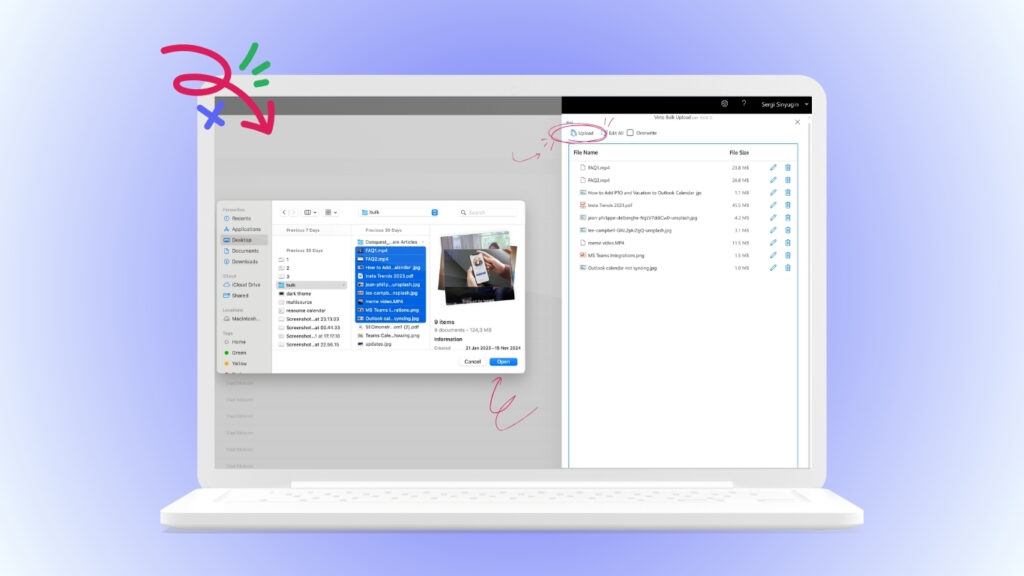
Virto Multiple File Upload App: This application addresses one of SharePoint’s most common pain points by enabling bulk file uploads. Organizations can upload large batches of files to SharePoint quickly and efficiently, significantly reducing the time required for content migration and regular document management tasks.
Advanced scheduling and collaboration tools
Merge all calendars in one place
Try Virto Shared Calendar to Sync all data
Virto Shared Calendar: This standalone web app and Microsoft Teams-integrated solution provides simple event management with tagging, color-coding, and anonymous sharing capabilities. Teams can consolidate events from SharePoint, Exchange, Google, and other sources into unified calendar views for simplified planning.

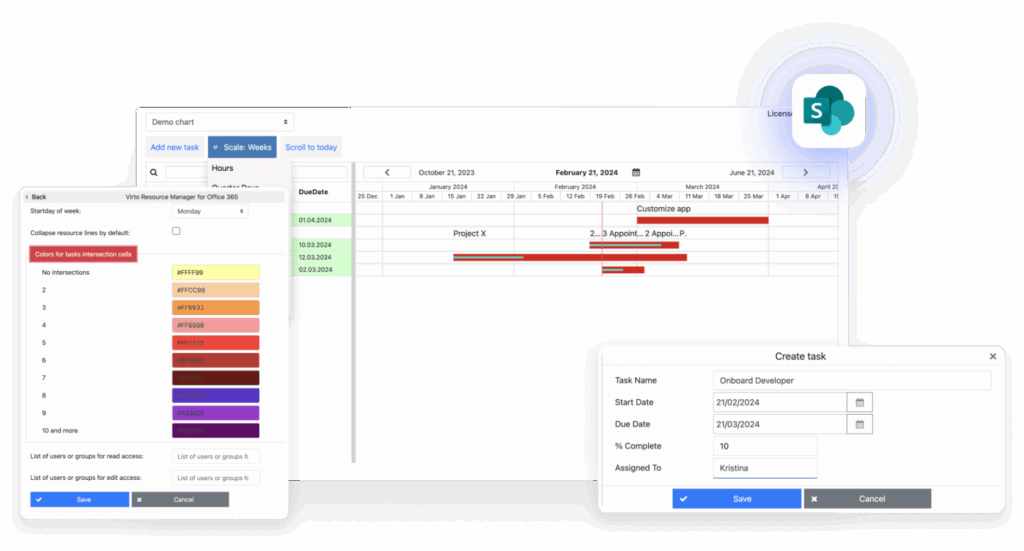
Virto Resource Management App: This application optimizes project management and resource allocation directly within SharePoint Online, enabling teams to track employee workloads and resource usage to improve allocation and project planning. Organizations can create, view, edit, or delete SharePoint tasks within charts for dynamic project management experiences, with Gantt charts visualizing project timelines and resource allocation.
Virto SharePoint On-Premise solutions
Organizations maintaining on-premise SharePoint deployments can access specialized web parts that extend functionality without requiring cloud migration.
Essential web parts for SharePoint On-Premise

Virto Calendar Web Part: This web part merges events from multiple sources like Exchange, Google, and SQL into unified calendar views while supporting different display modes (day, week, month, year) within local SharePoint environments. Organizations gain centralized scheduling without cloud dependencies.
Virto Kanban Board Web Part: This solution transforms SharePoint task lists into interactive, efficient Kanban boards with intuitive drag-and-drop functionality for task sorting and categorization. Teams can merge multiple lists into single boards, edit tasks directly on cards, and manage complex projects using subtasks, advanced filtering, sorting, and color-coding.
Virto Gantt Chart Web Part: This tool simplifies project tracking in SharePoint using flexible Gantt charts, enabling detailed task oversight and dependency management. Project managers visualize timelines, critical paths, and resource allocation within familiar SharePoint interfaces.
Virto Multiple File Operations: This solution executes various file actions including upload, download, delete, copy, move, check-in, approve, and edit operations in bulk. Organizations significantly reduce time spent on routine content management tasks while maintaining audit trails and version control.
Explore VirtoSoftware use cases
Integration advantages and implementation benefits
VirtoSoftware’s applications provide measurable value through enhanced productivity, streamlined workflows, and reduced administrative overhead while maintaining enterprise security standards.
- Microsoft ecosystem harmony: VirtoSoftware solutions integrate fully with Microsoft 365, providing consistency in security and user experience. Organizations avoid the security and training complications associated with third-party platforms while gaining specialized functionality that Microsoft’s native tools don’t provide.
- Rapid deployment and adoption: VirtoSoftware enables two-click installation processes with 14-day free trials, allowing organizations to test functionality before committing to purchases. The company provides 24/7/365 global support from product experts, ensuring smooth implementation and ongoing assistance.
- Comprehensive productivity enhancement: Virto ONE Cloud provides essential Microsoft 365 tools in a single purchase, offering access to multiple products optimized for SharePoint Online with unified expert support. Organizations gain calendar management, task visualization, resource planning, and workflow automation without managing multiple vendor relationships.
- Enterprise-grade security and compliance: VirtoSoftware builds solutions with organizational control and visibility over access, data, and security in mind. Applications employ robust security measures in compliance with industry standards, ensuring enterprise data protection while extending SharePoint functionality.
Strategic implementation considerations
Organizations achieve optimal results by viewing VirtoSoftware applications as strategic enhancements rather than replacements, creating synergies with existing Microsoft investments.
- Complementary enhancement approach: VirtoSoftware solutions work alongside SharePoint Premium (Advanced Management) and Copilot rather than replacing native functionality. Organizations can use VirtoSoftware applications for day-to-day user experience improvements (calendars, Kanban boards, Gantt charts) while leveraging SharePoint Premium for governance and Copilot for content acceleration. This combination provides both operational efficiency and enterprise compliance.
- Scalable productivity transformation: Teams can connect to the Microsoft 365 tools and internet calendars they use most, enabling everyone to work in one unified environment. Organizations avoid productivity losses associated with application switching while maintaining familiar SharePoint interfaces and security models.
- ROI through automation and efficiency: Implementing VirtoSoftware solutions enables organizations to save employee time by automating routine tasks, simplify project and document management, and increase work process transparency through visualization tools. Companies adapt SharePoint to specific business needs without complex customization projects or extensive development resources.
The combination of SharePoint’s enterprise foundation with VirtoSoftware’s specialized productivity enhancements creates comprehensive work environments that support both individual efficiency and organizational governance requirements. SharePoint becomes not just a platform for data storage, but a full-fledged tool for organizing work processes customized to any business’s specific requirements.
👉 How can VirtoSoftware help with Notion SharePoint? VirtoSoftware doesn’t directly bridge Notion and SharePoint, but it transforms SharePoint into a more flexible and user-friendly platform that addresses many reasons teams gravitate toward Notion in the first place. Our Virto Calendar App consolidates scheduling across multiple sources into intuitive views, while Virto Kanban Board App brings visual project management directly into SharePoint and Teams without the complexity typically associated with enterprise platforms. For organizations using both systems, VirtoSoftware essentially makes SharePoint feel less corporate and more collaborative, reducing the friction that often drives teams to seek Notion-like alternatives while maintaining enterprise governance and security standards.
Conclusion on Notion vs SharePoint
Notion and SharePoint address similar organizational challenges but serve fundamentally different contexts and requirements. Notion excels in flexibility, rapid implementation, and collaborative knowledge management, making it ideal for creative teams, startups, and organizations prioritizing adaptability over rigid governance. SharePoint dominates in enterprise content management, compliance frameworks, and deep Microsoft 365 integration, serving corporations requiring sophisticated security, audit trails, and standardized processes.
The platform choice depends on organizational priorities rather than feature comparisons alone. Teams seeking quick deployment and flexible information architecture will find Notion’s unified workspace approach compelling, especially with recent additions like Calendar with Microsoft Teams conferencing, Sites with custom domains, and Mail integration. Organizations requiring comprehensive governance, advanced security controls, and native Microsoft ecosystem integration should prioritize SharePoint, particularly with AI-powered Copilot capabilities and SharePoint Premium features.
For many organizations, a combined approach offers optimal value. Teams can leverage Notion for operational knowledge management, creative collaboration, and flexible project coordination while using SharePoint for official document storage, compliance requirements, and Microsoft 365 integration. This hybrid strategy captures the benefits of both platforms without forcing users into inappropriate tools.
Integration between platforms remains limited despite recent improvements. While Notion Calendar enables Microsoft Teams conferencing and an AI Connector (beta) provides experimental Teams integration, organizations should expect manual coordination or third-party automation tools for deeper connectivity. The lack of native SharePoint synchronization requires careful planning for organizations wanting to use both systems effectively.
To enhance SharePoint’s capabilities beyond native functionality, VirtoSoftware’s comprehensive suite of productivity applications addresses common workflow challenges through specialized tools. Calendar overlay applications, Kanban boards, Gantt charts, and bulk file operations transform SharePoint into a more efficient and user-friendly work environment while maintaining enterprise security and compliance standards.
Experience VirtoSoftware’s productivity-enhancing applications firsthand. Schedule a personalized demo to see how our calendar, Kanban, and project management tools can transform your team’s workflows, or start a free 14-day trial to test functionality in your own environment. Visit virtosoftware.com to download trial versions directly.
In the meantime, peruse additional resources on our blog to deepen your knowledge: