How to send an e-mail to multiple recipients in a list field (People/ Groups with multiple recipients) from SPD workflow?
Answer #1: You will not be able to do this specific task with standard SharePoint Designer workflows.
As you know it is possible only to target a specific value based on the value in another column. The easiest work-around would be to create a SharePoint security group which contains users and then target this group in the Send Email action. Just make sure that the group is configured for membership to be visible by all users. I know that it is not perfect solution in managing information twice, but this is all we can do with SharePoint Designer.

Answer #2:
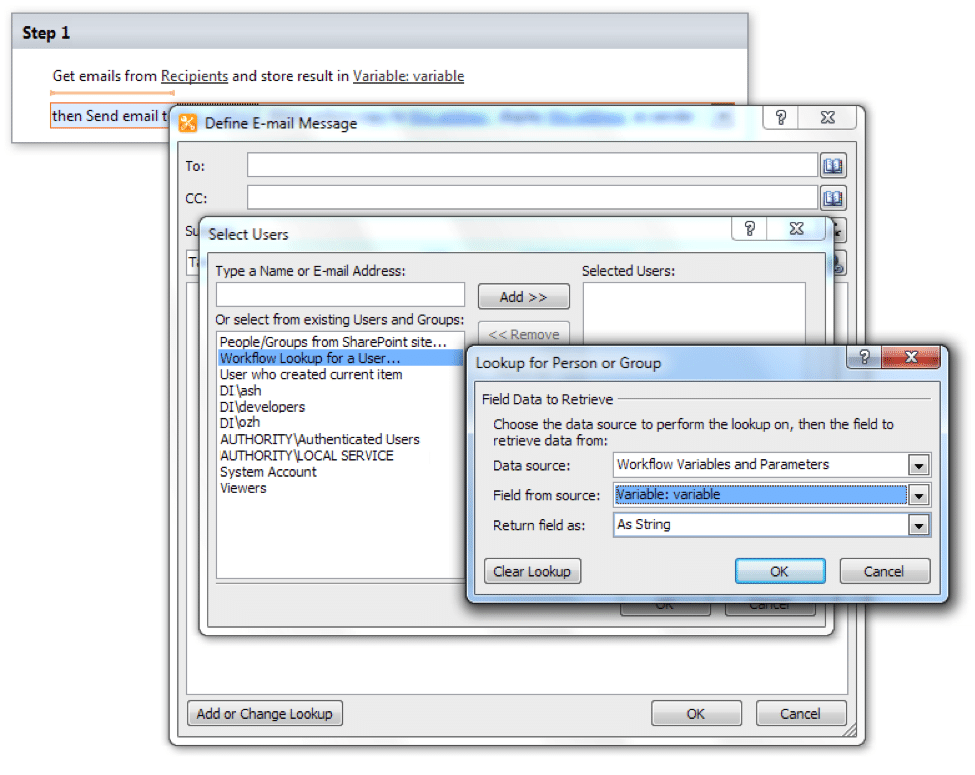
The alternative solution is using Get emails from field in Current Item function from Virto Sharepoint Workflow Activities Exntesions.
This activity extracts all emails from a field in filtered list items and stores the results in variables. You can use it to get email recipients from an external list. The activity enumerates list items, then extracts emails from a specific field and returns a string with unique emails, separated by semicolons (“;”).
The activity supports automatic detection of email from user string (DOMAINuserName) and SPUser(s) object.

SharePoint Workflow Designer Phrase
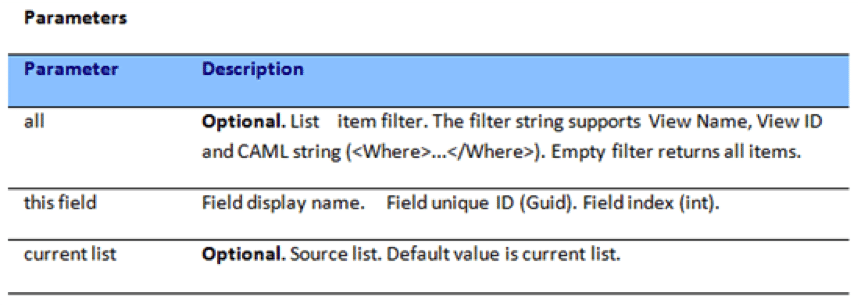
Get emails from all items, from this field in current list and store results in a variable.
Installation Guide
- Download and install Virto Sharepoint Workflow Activities Kit.
- Run SharePoint Designer and create a new workflow for the list.
- Click “Add a new action”.
- Select “Virto Actions” category and add “Get emails from field in Current Item” activity.
5. Select field.

- Finally, add “Send email” activity and set email recipient from Workflow Data.