SharePoint Workflow Scheduler by Virto with the newest update was released. SharePoint Workflow Scheduler is a tool for SharePoint 2016, 2013, 2010, and 2007, that allows users to run any SharePoint workflow within a site collection on a specific date and time. The schedule of a SharePoint workflow includes hourly and recurrent options. Virto SharePoint Workflow Scheduler can be installed on a SharePoint site and does not require Visual Studio or SharePoint Designer to schedule your SharePoint workflows. With the newest release, we have added two features related to SharePoint workflows with errors. Now, a SharePoint workflow is not stopped if an error occurs.
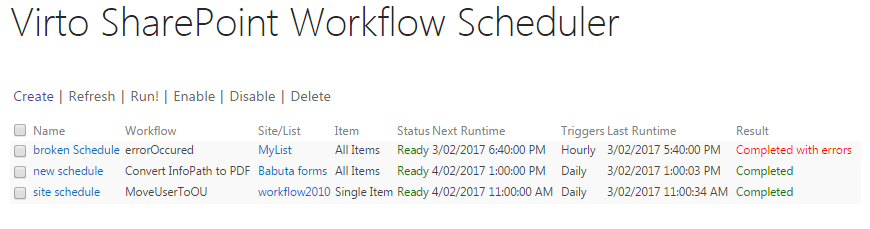
Also, you can view SharePoint workflow logs if you click on the SharePoint workflow name. You will be redirected to a folder where you can examine all details of this SharePoint workflow.

You can download the newest version of Virto SharePoint Workflow Scheduler or try its 30-days free trial. You can also use with this product the 270+ custom SharePoint workflow actions from Virto SharePoint Workflow Activities Extensions Kit.
| Related Products: |
|---|
 |

| | SharePoint workflow activities | SharePoint Workflow Scheduler |